Overview
SheetXAI's NeuronWriter integration allows you to process keyword lists directly from your spreadsheet, automatically generating comprehensive SEO analysis and content optimization insights. This powerful integration eliminates the need to manually copy keywords between platforms and streamlines your SEO workflow.
What is NeuronWriter?
NeuronWriter is an advanced SEO content optimization tool that analyzes keywords and provides detailed insights including:
-
SERP Analysis: Top-ranking content analysis for your target keywords
-
Content Optimization: Recommendations for improving content relevance and ranking potential
-
Competitor Research: Analysis of what's working for top-performing pages
-
Semantic Keywords: Related terms and phrases to enhance content depth
-
Content Scoring: Objective scoring of content optimization levels
How NeuronWriter Integration Works
SheetXAI reads your keyword data from your spreadsheet and automatically processes each keyword through NeuronWriter's analysis engine. You can customize search engines, languages, and processing options, with results delivered back to your workflow seamlessly.
Getting Started
Step 1: Prepare Your Keyword Data
Organize your keywords in a spreadsheet with these columns:
Required Column:
- Keywords - Your target keywords for SEO analysis
Optional Columns:
-
Engine - Search engine for analysis (google.com, google.co.uk, bing.com, etc.)
-
Language - Target language for analysis (English, Spanish, German, etc.)
Step 2: Process with NeuronWriter
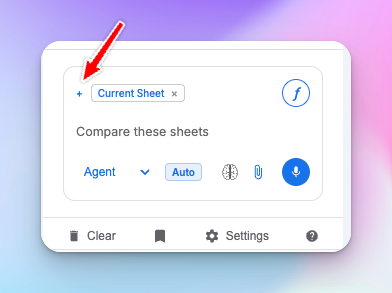
Important: Before processing, click the + icon next to "current sheet" and select NeuronWriter (if not already added).
Use simple, natural language commands:
Example Commands:
-
"Run these keywords through NeuronWriter"
-
"Analyze my keyword list with NeuronWriter"
-
"Process this spreadsheet with NeuronWriter"
-
"Generate NeuronWriter analysis for these keywords"
Step 3: Configure Analysis Settings
SheetXAI will identify your data structure and confirm settings, then send it to NeuronWriter. Keep the app open and the resulsts will be returned to your sheet in a few minutes.
Example Spreadsheet Structures
Basic Keyword List
| Keywords |
|---|
| digital marketing tips |
| SEO best practices |
| content marketing 2024 |
| social media strategy |
| email marketing tools |
Command: "Run these keywords through NeuronWriter"
Result: All keywords analyzed using google.com and English as defaults
Advanced Keyword Analysis
| Keywords | Engine | Language |
|---|---|---|
| digital marketing tips | google.com | English |
| consejos de marketing digital | google.es | Spanish |
| SEO best practices | google.co.uk | English |
| marketing numérique | google.fr | French |
| content marketing 2024 | bing.com | English |
Command: "Process this spreadsheet with NeuronWriter using custom engines and languages"
Result: Each keyword analyzed with its specific engine and language settings
SEO Campaign Planning
| Keywords | Engine | Language | Priority |
|---|---|---|---|
| best CRM software | google.com | English | High |
| CRM comparison 2024 | google.com | English | High |
| small business CRM | google.com | English | Medium |
| free CRM tools | google.com | English | Medium |
| enterprise CRM solutions | google.com | English | Low |
Command: "Analyze my CRM keyword list with NeuronWriter"
Result: Comprehensive SEO analysis for each keyword in your campaign
Real-World Use Cases
Content Marketing Strategy
Scenario: You're planning a quarter's worth of blog content and need SEO insights for 50 target keywords.
Process:
-
List all target keywords in column A
-
Add target markets in Engine column (google.com, google.co.uk, etc.)
-
Command: "Run these keywords through NeuronWriter"
-
Receive comprehensive SERP analysis for each keyword
Benefit: Data-driven content planning with competitor insights and optimization recommendations.
Multi-Market SEO Expansion
Scenario: You're expanding into international markets and need localized keyword analysis.
Process:
-
Organize keywords by market with appropriate search engines and languages
-
Include google.de for Germany, google.fr for France, etc.
-
Command: "Process this international keyword list with NeuronWriter"
-
Get market-specific SEO insights for each region
Benefit: Localized SEO strategy with market-specific competitive intelligence.
Client SEO Audits
Scenario: You're conducting SEO audits for multiple clients and need comprehensive keyword analysis.
Process:
-
Compile client keywords with their target markets and languages
-
Use custom engines based on client geographic focus
-
Command: "Analyze these client keywords with NeuronWriter"
-
Generate detailed SEO reports for each client's keyword portfolio
Benefit: Professional SEO audits with actionable insights and competitive analysis.
Product Launch SEO
Scenario: You're launching a new product and need to identify the best keywords for content optimization.
Process:
-
Research product-related keywords and organize them by intent
-
Include variations for different search engines and markets
-
Command: "Run these product keywords through NeuronWriter"
-
Identify high-opportunity keywords with detailed optimization guidance
Benefit: Strategic keyword selection with comprehensive optimization roadmap.
Related SheetXAI Features
Keyword Research Enhancement
-
SAI Formula: Generate keyword variations with
#SAI suggest related keywords for #A -
Keyword Expansion: Find long-tail opportunities with
#SAI generate long-tail keywords for #A -
Intent Analysis: Classify keywords with
#SAI identify the search intent for #A
Note: The
#SAIformat automatically transforms into the right spreadsheet syntax every few seconds when the chat panel is open. If you need the native Google Sheets vs Excel formula syntax, use the SAI Commands Builder to generate it.
Content Creation Support
-
Content Briefs: Generate content outlines based on NeuronWriter insights
-
Title Generation: Create SEO-optimized titles using keyword analysis
-
Meta Descriptions: Write compelling meta descriptions for target keywords
Competitive Analysis
-
Competitor Research: Analyze competitor keyword strategies
-
SERP Analysis: Understand what's ranking for your target keywords
-
Content Gaps: Identify opportunities your competitors are missing
Reporting and Analytics
-
SEO Reports: Create comprehensive SEO analysis reports
-
Keyword Tracking: Monitor keyword performance over time
-
ROI Analysis: Connect keyword insights to business outcomes
Ready to supercharge your SEO strategy? Organize your keywords, configure your analysis settings, and let SheetXAI process your entire keyword portfolio through NeuronWriter for comprehensive SEO insights!